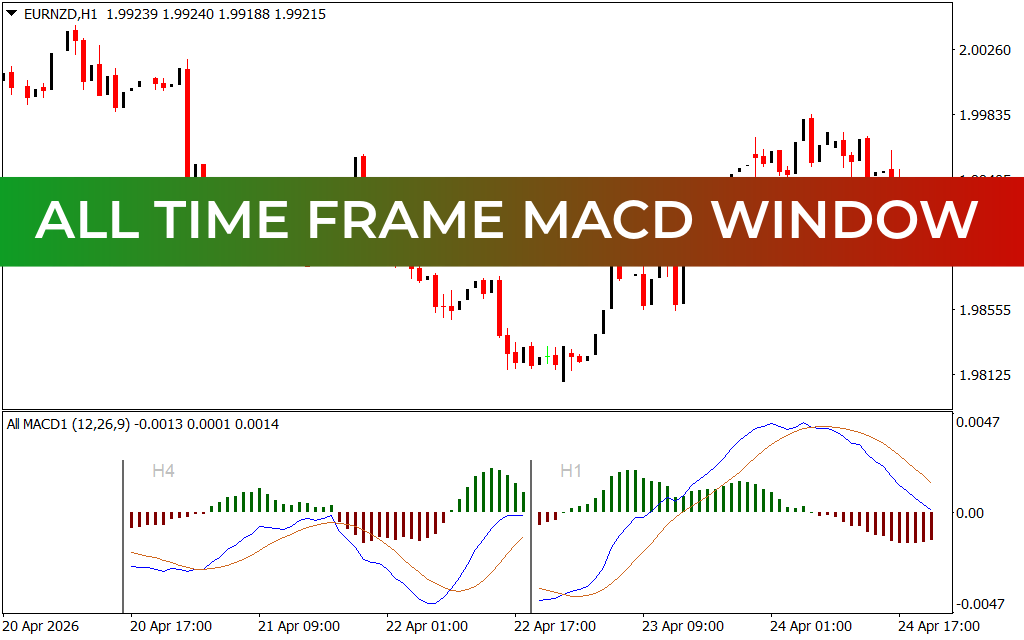
In the fast-paced world of Forex trading, understanding the relationship between different market cycles is the key to consistent profitability. While a single-period Moving Average Convergence Divergence (MACD) oscillator is a staple for many, professional traders know that the real "alpha" lies in multi-timeframe alignment. The All Time Frame MACD Window for MetaTrader 4 is a premier technical solution that allows you to visualize institutional momentum across various horizons within a single, streamlined interface.
The Power of Multi-Timeframe MACD Analysis
The MACD is traditionally used to identify changes in the strength, direction, momentum, and duration of a trend. However, a bullish crossover on a 1-minute chart can often be a "fake-out" if the 1-hour or 4-hour charts are in a massive bearish decline. The All Time Frame MACD Window solves this by displaying separate MACD panels—such as the H4 and H1 periods—directly on your current workspace.
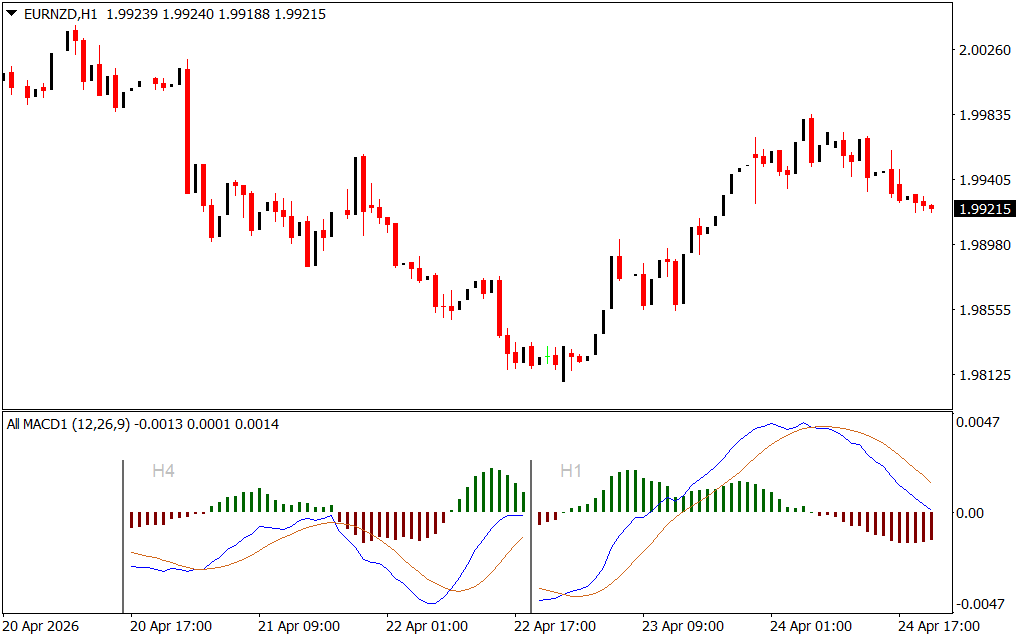
By observing these windows side-by-side, traders can identify "momentum harmony." As seen in the recent EURNZD H1 Price Action from late April 2026, the indicator provides a clear view of how different cycles interact:
- The H4 Panel: Offers a "macro" view, showing long-term trend exhaustion or new trend births through histogram peaks and troughs.
- The H1 Panel: Provides the "micro" view, identifying precise entry and exit points that align with the H4 bias.
- Signal Line Crossovers: The interaction between the blue and orange lines across both panels helps confirm high-probability trend shifts.
Strategic Execution: Riding the Institutional Wave
The primary advantage of this tool is its ability to filter out market noise. In the provided EURNZD example, the H1 price experienced a significant recovery from 1.98125 toward 2.00260. A trader using the All Time Frame MACD Window could see the H4 histogram gradually moving from red (bearish) to green (bullish) as price stabilized, while the H1 panel provided the actual "cross" signal for the entry.
This "top-down" approach ensures that you are never trading against the "big money." If the H4 panel shows a dominant bearish histogram while the H1 shows a bullish cross, you know the move is likely a temporary retracement rather than a full Trend Reversal. This insight alone can save a trader from hundreds of unnecessary stop-outs.
Why Choose the All Time Frame MACD Window?
This indicator is designed for traders who value structural integrity over simple guesswork. It is a lightweight, non-repainting tool that integrates seamlessly into any MT4 setup.
- Consolidated Interface: Eliminate the need to switch tabs constantly; see the big picture and the small details simultaneously.
- Visual Clarity: Clear color-coded histograms (green for bullish, red for bearish) make it easy to spot transitions in real-time.
- Universal Application: Whether you are trading Forex pairs like EURNZD, indices, or commodities, the laws of momentum remain the same.
Don't settle for a fragmented view of the market. Download the All Time Frame MACD Window for MT4 and start trading with the confidence that only comes from full-scale multi-timeframe alignment.
11 Downloads
Last Update:
Apr 25, 2026 14:12 PM
Published:
Feb 02, 2026 21:52 PM
Category: