The Money Management Calculator 0.1 for MT4 is an intelligent Forex Indicator designed to automatically calculate trading lot sizes based on your predefined risk or loss budget per trade.
Risk management is one of the most crucial aspects of successful trading. Without it, even profitable strategies can lead to significant losses over time. This indicator helps traders maintain consistency, minimize losses, and manage multiple portfolios efficiently — ensuring that every trade aligns with a structured risk management plan.
With the Money Management Calculator 0.1, traders no longer need to calculate lot sizes manually. Instead, the indicator instantly displays the optimal position size directly on the MT4 chart, allowing you to focus on market analysis and execution.
How the Money Management Calculator 0.1 Works in MT4
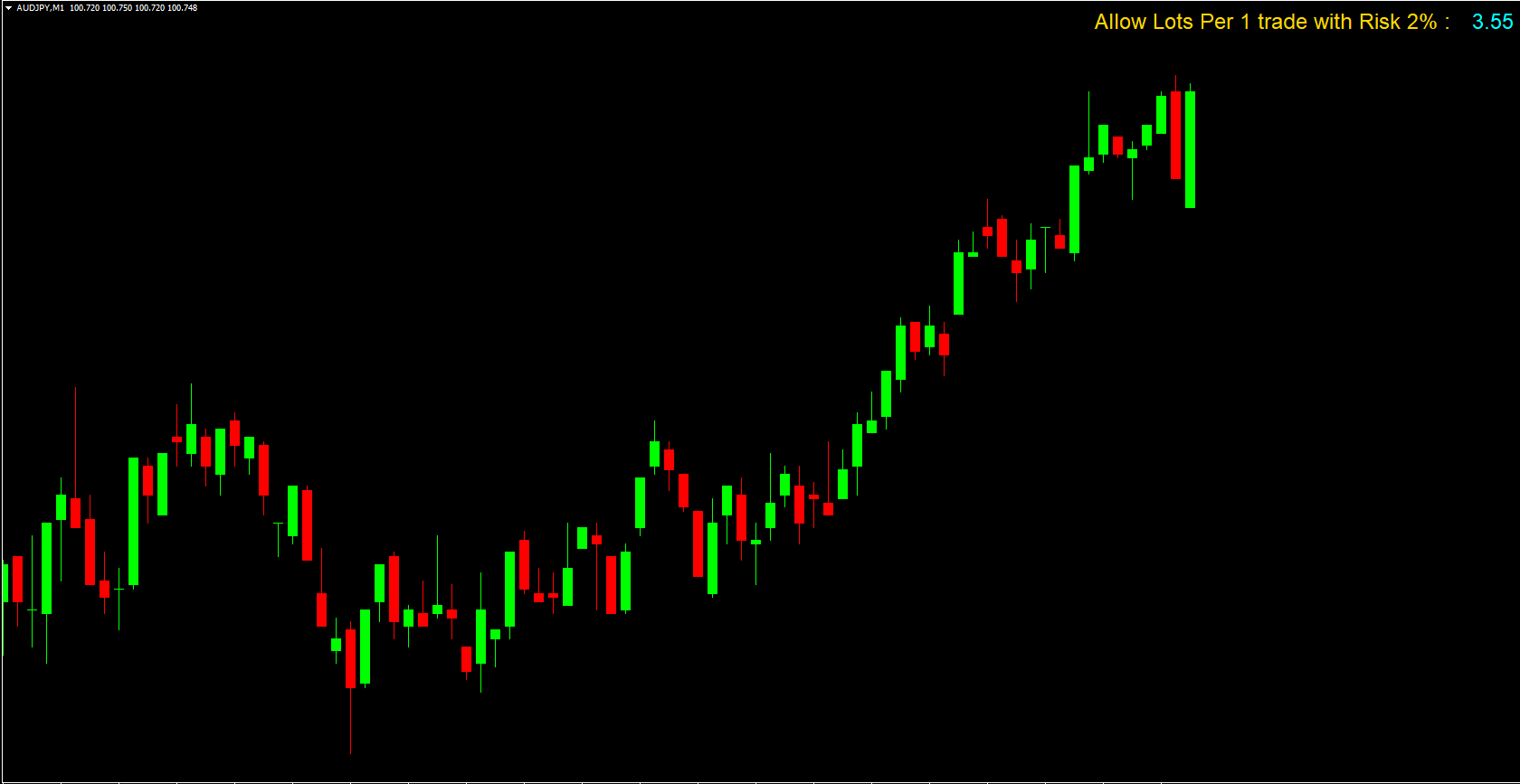
Once installed on your MetaTrader 4 platform, the indicator calculates and displays the recommended trading lot size at the top-left corner of your chart before you place a trade.
This calculation is based on:
A predefined loss budget (e.g., 2% of account balance).
A default stop loss distance (e.g., 40 pips).
The account equity and currency pair volatility.
The indicator uses the 2% risk rule, a widely accepted money management guideline among professional traders. This rule means you should never risk more than 2% of your trading capital on a single trade.
For example:
If your account balance is $10,000, the 2% rule limits your risk per trade to $200.
If your stop loss is 40 pips, the indicator automatically calculates the lot size that fits this risk tolerance.
This way, your position size remains proportional to your account balance, helping you avoid oversized trades that could lead to unnecessary losses.
Key Features of the Money Management Calculator 0.1 for MT4
Automatic Lot Size Calculation: No more manual math — get the correct position size instantly.
2% Rule Integration: Adheres to one of the most effective risk management principles.
Customizable Settings: Adjust risk percentage and stop loss values based on your strategy.
Real-Time Display: Shows calculated lots directly on the chart before placing a trade.
Portfolio-Friendly: Manage multiple trading accounts or strategies with consistent risk control.
Beginner-Friendly Interface: Simple to use and suitable for both novice and advanced traders.
How to Trade Safely Using the Indicator
Load the Indicator
Attach the Money Management Calculator 0.1 to any MT4 chart.
Check the Displayed Lot Size
Before executing any trade, verify the recommended lot size shown at the top-left corner of your screen.
Adjust Settings (Optional)
You can modify:
Risk percentage (e.g., from 2% to 1% for conservative trading).
Stop loss in pips (default 40 pips).
Account balance or margin settings if needed.
Place Trades Confidently
Use the displayed lot size to execute your trade. This ensures you’re staying within your daily loss limit and protecting your account equity.
Why the 2% Risk Rule Matters
The 2% rule is a cornerstone of sustainable trading. It helps traders:
Avoid emotional decision-making.
Preserve capital during losing streaks.
Maintain consistent account growth.
If you lose 2% per trade, it would take 50 consecutive losses to wipe out your capital — which is extremely unlikely if you have a solid strategy. This simple rule helps traders stay in the game longer and compound profits effectively.
Practical Example
Suppose you have a $5,000 account and plan to trade EUR/USD with a 40-pip stop loss.
The 2% risk limit equals $100.
The indicator calculates that you should use a lot size of 0.25.
By following the indicator’s guidance, you’ll maintain discipline and prevent excessive losses — no matter how the trade performs.
Conclusion
The Money Management Calculator 0.1 for MT4 is an essential risk management tool that every forex trader should use. It automatically determines the optimal trading lot size based on your risk budget and stop loss, ensuring your account stays protected from oversized losses.
By applying the 2% rule and using this indicator, you’ll trade smarter, preserve your capital, and increase your chances of long-term profitability.
Visit IndicatorForest.com today to download the Money Management Calculator 0.1 for free and take control of your trading risk like a professional.
FAQ
3 Downloads
Published:
Nov 11, 2025 21:28 PM
Category: