Master Volatility with the ATR Channels V1 Indicator for MetaTrader
In the high-velocity world of Forex trading, understanding price volatility is the key to managing risk and maximizing profit. While traditional moving averages tell you where the price has been, they often fail to indicate where the price is likely to reach its limits. The ATR Channels V1 is a premier volatility-based technical indicator that provides traders with a dynamic map of market boundaries, allowing for professional-grade trend analysis and precise trade execution.
The Power of Average True Range (ATR)
At its core, the ATR Channels V1 utilizes the Average True Range (ATR) to calculate market volatility. Unlike static Support And Resistance lines, these channels expand and contract based on the actual "pulse" of the market. When volatility increases, the channels widen to accommodate larger price swings; when the market settles, the channels tighten, signaling potential consolidation.
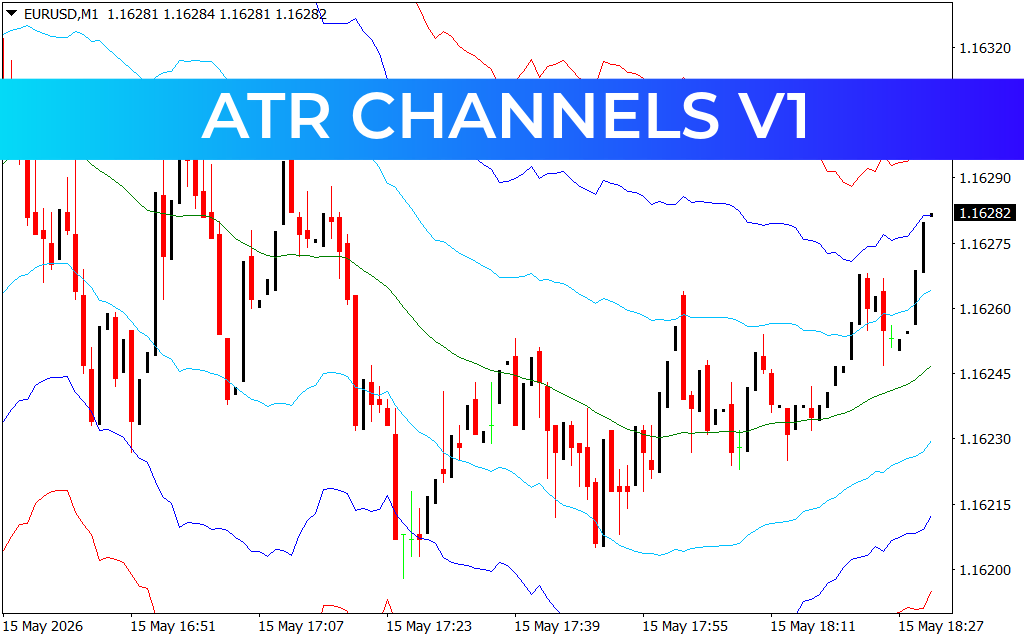
As demonstrated in the EURUSD M1 chart analysis, the indicator plots a central median line surrounded by several outer bands:
- The Median (Baseline): Acts as the primary trend direction filter. When price remains above the green median, the immediate bias is bullish.
- The Inner Bands (Light Blue): Represent standard volatility ranges where price typically spends most of its time during healthy trends.
- The Outer Extremes (Dark Blue and Red): These levels represent overbought and oversold territories. When price touches the red outer bands, it often signals an exhaustion point, providing high-probability opportunities for mean-reversion traders.
Strategic Trading: From Scalping to Trend Following
The ATR Channels V1 is a versatile workstation suitable for various trading styles:
- Scalping Precision: On ultra-low timeframes like the M1, the indicator identifies rapid-fire reversal zones. Scalpers can look for long entries when price pierces the lower blue bands and short entries when it hits the upper red boundaries.
- Trend Expansion Trading: For trend followers, the indicator acts as a "trailing" guide. As long as the price continues to ride the upper channels, the trend is considered strong. A close back toward the median line serves as a warning of trend fatigue.
- Dynamic Stop-Loss Placement: Because the channels are based on ATR, they provide the most logical placement for stop-losses. Placing a stop just outside the outer bands ensures you aren't "stopped out" by normal market noise, only by a genuine change in trend.
Why Professional Traders Choose ATR Channels V1
In a market dominated by algorithms, using "fixed" levels is often a disadvantage. The ATR Channels V1 provides a biological view of price movement that adapts in real-time.
- Visual Clarity: The color-coded system allows for instant decision-making without messy manual calculations.
- Reduced Overtrading: By identifying when price is in the middle of the "no-man's land" between bands, the indicator helps traders stay patient for higher-probability setups at the extremes.
- Multi-Asset Utility: Whether you are trading Forex majors, volatile Crypto pairs, or Commodities, the ATR-based math remains consistent across all markets.
By integrating the ATR Channels V1 into your MetaTrader toolkit, you move beyond simple price watching. You begin to trade the volatility itself, allowing for more consistent results and tighter risk control.
3 Downloads
Last Update:
May 15, 2026 21:35 PM
Published:
Jan 21, 2026 17:22 PM
Category: