The MACD Version Two Mod Indicator is a popular and useful forex trading indicator developed for the MetaTrader 4 (MT4) platform. This indicator is widely used by forex traders to identify market trend direction and potential entry and exit points with greater accuracy. Known for its reliability and simplicity, the MACD Version Two Mod Indicator is suitable for both beginner and experienced traders.
This indicator is completely free to download and easy to install on the MT4 platform, making it accessible to traders worldwide. By improving the traditional MACD structure, it delivers clearer signals and better visual representation of market momentum.
Understanding How MACD Version Two Mod Indicator Works
The MACD Version Two Mod Indicator works by analyzing the convergence and divergence of two moving averages. It calculates the difference between a fast-moving average and a slow-moving average, then compares it with a signal line to determine momentum strength and trend direction.
When these moving averages interact, the indicator generates buy and sell signals that help traders anticipate price movement. This allows traders to align their trades with the prevailing market trend rather than trading against momentum.
Key Features of MACD Version Two Mod Indicator
Trend Direction Identification
The indicator clearly shows whether the market is bullish or bearish by observing the relationship between the MACD line and the signal line. This helps traders stay on the right side of the market.
Buy and Sell Signal Generation
A buy signal is generated when the MACD line crosses above the signal line, indicating bullish momentum
A sell signal appears when the MACD line crosses below the signal line, suggesting bearish momentum
These signals help traders identify high-probability entry and exit points.
Improved Market Momentum Analysis
Compared to the standard MACD, the modified version offers smoother and clearer signals, reducing noise and false indications during ranging markets.
How to Use MACD Version Two Mod Indicator
Installation and Setup
Download the MACD Version Two Mod Indicator for MT4
Install it in the MetaTrader 4 indicators folder
Attach the indicator to any currency pair or timeframe
Adjust settings if necessary to match your trading strategy
Trading Signals Explanation
Bullish Setup: MACD line crosses above the signal line, indicating a potential uptrend
Bearish Setup: MACD line crosses below the signal line, indicating a possible downtrend
Trend Confirmation: Strong separation between lines confirms Trend Strength
Trading Example
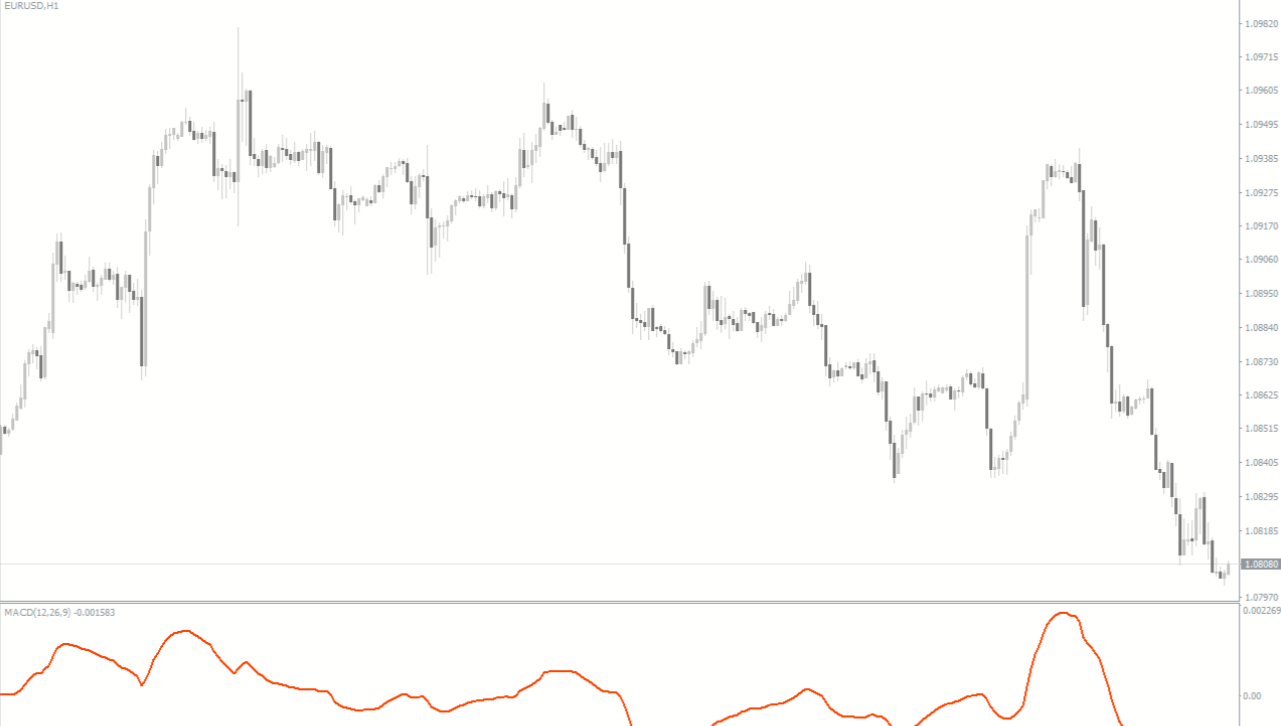
On an EUR/USD H1 chart, the MACD Version Two Mod Indicator shows the MACD line crossing above the signal line, confirming bullish momentum. Traders can enter a buy trade and follow the trend until an opposite signal appears. Similarly, a bearish crossover can help identify sell opportunities.
Advantages of MACD Version Two Mod Indicator
Improves trend and momentum analysis
Helps traders identify precise entry and exit points
Reduces false signals compared to standard MACD
Suitable for Scalping, day trading, and swing trading
Free to use and fully compatible with MT4
By incorporating the MACD Version Two Mod Indicator into a trading strategy, traders can enhance timing, improve discipline, and reduce emotional trading decisions.
Conclusion
The MACD Version Two Mod Indicator MT4 is a powerful and reliable forex trading tool that helps traders analyze market trends and generate accurate buy and sell signals. Its improved MACD calculation and user-friendly design make it an excellent choice for traders of all experience levels. Visit IndicatorForest.com to download the MACD Version Two Mod Indicator for free and strengthen your MT4 trading strategy today.
FAQ
MACD Version Two Mod improves upon the traditional MACD by offering smoother and clearer signals with reduced noise. It calculates the convergence and divergence of two moving averages and compares them with a signal line, but with enhanced filtering that reduces false indications during ranging markets.
A buy signal occurs when the MACD line crosses above the signal line, indicating bullish momentum and a potential uptrend. A sell signal appears when the MACD line crosses below the signal line, suggesting bearish momentum and a possible downtrend. Strong separation between the lines confirms trend strength.
The indicator works on all MT4 timeframes and is suitable for scalping, day trading, and swing trading. Many traders prefer using it on H1 and H4 charts where MACD signals are clearer and less affected by intraday noise compared to very short timeframes.
Monitor the relationship between the MACD line and signal line. When both lines are moving in the same direction with strong separation, it confirms a strong trend. When the lines converge or cross, it may indicate trend weakening or reversal, helping you stay on the right side of the market.
Combine it with support and resistance levels for entry timing, RSI for overbought/oversold confirmation, and price action analysis to validate signals. Using multiple confirmations helps improve accuracy and reduces the risk of trading false signals during consolidation periods.
Published:
Dec 16, 2025 04:13 AM
Category: